Creating a Private Extension in Azure DevOps
To create an extension in Azure DevOps, these are the pre-requisites
- Node.JS should be installed
- TFX-CLI should be installed
- Should be a owner of an Azure DevOps Organization
After installing Node.js, install tfx-cli

Step 1: Run the below code for initializing npm package manifest
npm init -y
Then the manifest will be created as shown

Step 2: Then install the Microsoft VSS Web Extension SDK by running the below command (VSS Web Extension SDK is essential for calling the API’s)

Step 3: Create an Extension manifest file with name “vss-extension.json” at the root of your extension directory with the below code
{
    "manifestVersion": 1,
    "id": "my-private-extension",
    "publisher": "publisherID",
    "version": "1.0.0",
    "name": "My Private Extension",
    "description": "A sample Visual Studio Services extension",
    "public": false,
    "categories": ["Azure Repos"],
    "targets": [
        {
            "id": "Microsoft.VisualStudio.Services"
        }
    ],
    "contributions": [
        {
            "id": "my-hub",
            "type": "ms.vss-web.hub",
            "targets": [
                "ms.vss-code-web.code-hub-group"
            ],
            "properties": {
                "name": "My Private Hub",
                "uri": "Private.html"
            }
        }
    ],
    "files": [
        {
            "path": "Private.html",
            "addressable": true
        },
        {
            "path": "node_modules/vss-web-extension-sdk/lib",
            "addressable": true,
            "packagePath": "lib"
        }
    ]
}
The above code is essential for each and every extension as it denotes what are the files involved in the extension, what is the publisher ID and whether the extension is private or public and what are the categories for the extension
The above extension will display a simple page on the Hub in AzureDevOps
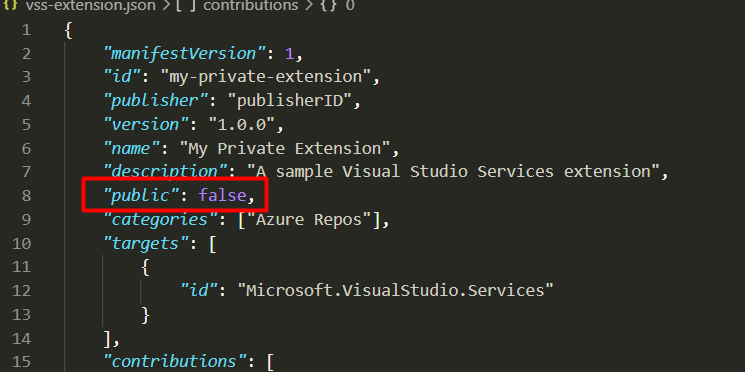
In the below extension code, Public is set to false, if the public is set to false the extension won’t be visible for the public and it can be only shared within the Azure DevOps Organizations by the Publisher
Step 3: Let us create a file called Private.html
<!DOCTYPE html>
<html xmlns="http://www.w3.org/1999/xhtml">
<head>
    <script src="lib/VSS.SDK.min.js"></script>
    <style>
        body {
            background-color: rgb(0, 67, 117);
            color: white;
            margin: 10px;
            font-family: "Segoe UI VSS (Regular)","-apple-system",BlinkMacSystemFont,"Segoe UI",sans-serif;
        }
    </style>
    <script type="text/javascript">
        VSS.init();
        VSS.ready(function() {
            document.getElementById("name").innerText = VSS.getWebContext().user.name;
            document.getElementById("project").innerText = VSS.getWebContext().project.name;
        });
    </script>
</head>
<body>
    <h1>Hello, <span id="name"></span></h1><BR><BR>
        <span id="project"></span></h1>
</body>
</html>
If you see in the above code, I am just getting the Context & Project Name and displaying it as output in an HTML file and the file is placed at the root of the extension directory as shown

Step 4: Now as our extension is ready, we need to package & publish the extension
Step 5: Before Publishing an extension you need a create a Publisher ID in Visual Studio MarketPlace
Step 6: Once you are ready with the Publisher ID, replace the publisher ID in vss-extension.json with the Publisher ID

Step 7: Now run the below command either from command prompt or Visual Studio Code’s Terminal as shown below
npx tfx extension publish
Once you run the command, it will get published and the extension will be created as shown

Step 8: Now upload the extension to Azure DevOps MarketPlace by going to https://marketplace.visualstudio.com/manage/publishers/xxxx and then click on “New Extension” and then choose Azure DevOps

Step 9: Then upload the extension as shown below

Step 10: As you see my private extension is published and it needs to be shared to be visible to anyone

And this extension won’t be visible to anyone unless it’s shared with another organization
